💾 Local Storage vs Cloud Storage for Security Cameras

TLDR
- On-premise recording keeps data entirely under your roof, ensuring total user privacy while eliminating mandatory monthly subscription fees.
- Remote hosting options deliver streamlined off-site streaming, instant file sharing, and automated backups that survive physical theft.
- Local memory hardware is vulnerable to destruction or theft if an intruder spots and steals the recording device during a breach.
- Cloud-reliant networks require continuous, high-speed upload bandwidth and can quickly accumulate substantial recurring plan costs.
- A hybrid system installation often provides the most resilient property defense by utilizing both storage methods simultaneously.
When you are configuring a modern residential video network, one fundamental infrastructure decision quietly shapes your entire user experience.
You have to decide exactly where your recorded surveillance files will live.
It might not feel like the most thrilling technical choice, but it holds massive weight over how your entire ecosystem performs when an actual incident unfolds.
How you manage this data directly dictates your long-term operating costs, digital privacy levels, and system reliability during a structural failure.
If you have spent hours wondering which direction makes sense for your property, you are in good company.
Let’s dive into the practical realities of local vs cloud storage security cameras so you can design a layout that aligns with your household budget and security goals.
🛠️ What Local Storage Means in Practical Application
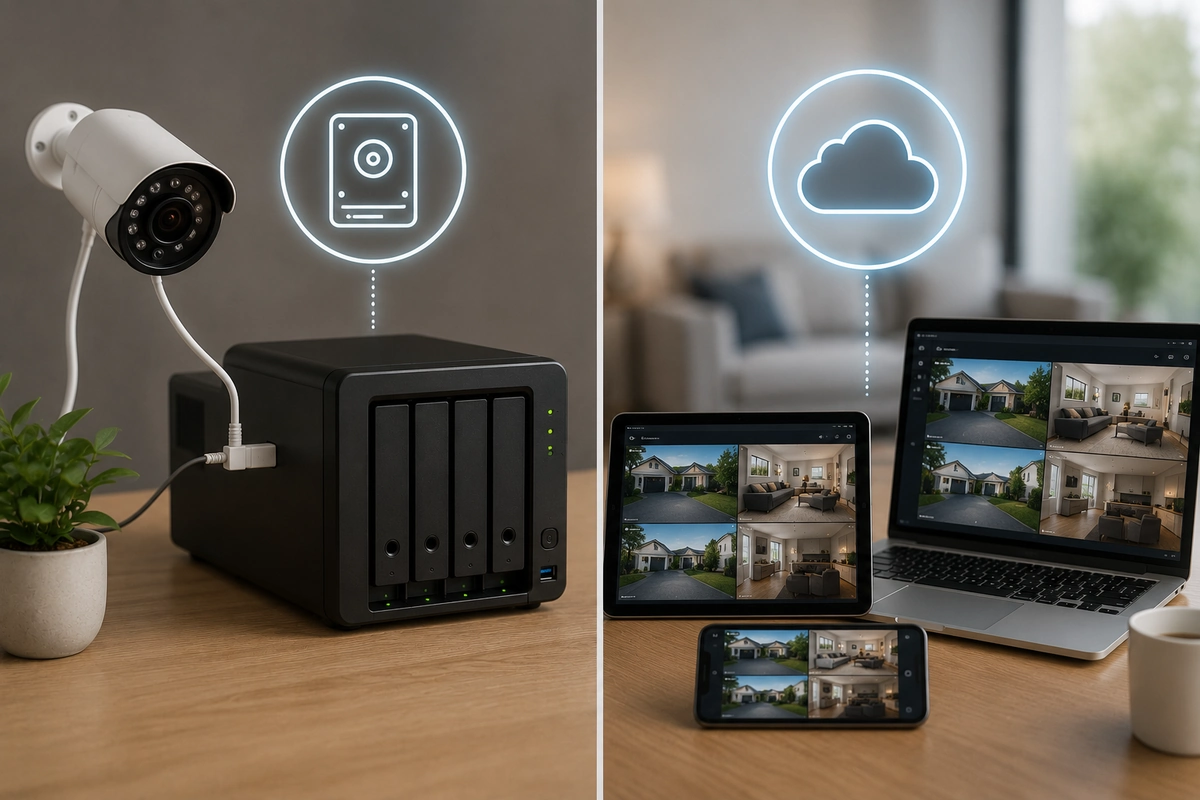
Opting for an on-site hardware solution means your surveillance lenses process video information and write it straight to a physical device on your property.
This usually looks like a compact microSD card slotted into the housing, an internal hard drive, or a dedicated Network Video Recorder (NVR) hidden safely inside a closet.
The primary operational advantage here is that your raw security data never leaves the boundaries of your physical residence.
📐 Physical Media Capacity Breakdown
| Media Format | Typical Storage Limits | Best Use Case Scenario | Overwrite Behavior |
| MicroSD Cards | 32GB to 512GB | Standalone perimeter lenses | Automatic looping recycling |
| SATA Hard Drives | 2TB to 10TB+ | Continuous multi-lens NVR setups | Oldest files purged first |
| Local Network Attached Storage | Scalable Terabytes | Custom smart automated grids | Variable policy controls |
Reviewing your baseline camera storage options is essential when mapping out a clean installation.
To explore the essential physical components needed to get a standalone system running right out of the box, check out our master blueprint on diy home security where to start.
☁️ How Cloud Storage Models Handle Your Data
Remote server hosting flips the traditional recording architecture completely on its head.
Instead of writing data to physical silicon under your roof, your camera compresses the surveillance files and beams them across your wireless network to a commercial data center.
This architectural shift unlocks seamless remote accessibility from virtually anywhere on the planet.
Whether you are checking in from an office cubicle, enjoying a weekend getaway, or managing an international trip, you can instantly review high-definition clips.
💡 Core System Insights
Bandwidth Allocation Alert: High-resolution wireless networks demand considerable upstream internet speeds to function smoothly. If your upload speed is limited, you can review our strategic guide on optimizing wi-fi for home security devices to prevent video drops and home network slowdowns.
📉 Comparing the Real Costs Over a Three-Year Period
The financial divergence between these two approaches becomes incredibly stark when you look past the initial checkout lane.
Local systems require an upfront hardware investment for high-end memory cards or an NVR box, but they deliver long-term security camera storage without subscription fees.
Remote setups usually offer affordable hardware, but they lock your advanced alert options behind a continuous service tier.
The compounding cost of cloud storage security cameras over several years can easily outpace the original purchase price of your equipment.
💰 Total Cost Ownership Projections
- Year One Hardware Phase: Local storage requires buying high-grade microSD cards up front, while cloud systems look cheaper due to subsidized device costs.
- Year Two Subscription Phase: Cloud platforms accumulate steady monthly charges, while local setups run completely free of ongoing management bills.
- Year Three Replacement Phase: Flash memory might need a quick hardware swap, but cloud subscription totals will continue to mount indefinitely.
If you are trying to maximize every dollar in your defensive budget, taking a long-term view of your expenses is crucial.
To help structure your investments intelligently, see our extensive analysis on how much should you spend on home security.
🔒 Protecting Data Privacy and Maintaining Local Control
If you are asking yourself, “should I use cloud or local storage cameras?”, data privacy will likely guide your final choice.
When you prioritize privacy local storage cameras are the gold standard because your video remains entirely within your home’s walls.
Cloud networks mean trusting a third-party commercial platform to safeguard your intimate daily routines.
🔐 Data Protection Checklist
- Ensure all local hardware endpoints utilize robust onboard hardware encryption.
- Create highly complex passwords and enable mandatory multi-factor validation for all cloud accounts.
- Isolate your surveillance hardware by reviewing our blueprint on should you put security devices on a guest network.
- Routinely audit which user accounts hold active access privileges to your remote video streams.
🚨 Threat Realities: What Happens During a Break-In?
A major vulnerability of a completely local layout is its susceptibility to physical tampering or theft.
If a seasoned criminal manages to spot your central recording hub during a break-in, they can simply snatch the physical drive.
If that happens, your vital video evidence walks right out the front door with the intruder.
Remote cloud systems solve this vulnerability beautifully by broadcasting the footage to an off-site server the moment a sensor trips.
Even if an intruder smashes your lens to pieces with a crowbar, the captured incident file remains completely safe and accessible on the remote server.
🛠️ Strategic Lens Placement Guide
To minimize physical tampering risks and protect your on-site hardware, dive into our tactical advice on where to place security cameras for maximum coverage.
🌐 Internet Dependence and Local Offline Resilience
Remote hosting platforms are completely dependent on the stability of your home internet service provider.
If an incoming storm knocks out your neighborhood data lines or an intruder intentionally cuts your exterior cables, your cloud-reliant system can drop offline instantly.
Local storage cameras will keep recording to their physical media through blackouts and network drops without losing a single frame.
📊 Network Outage Survival Rates
| Storage Paradigm | Performance During Wi-Fi Outage | Performance During Complete Blackout | Required Local Hardware Upgrade |
| Pure Cloud Platform | Recording Pauses Instantly | Total System Shutdown | Cellular Backup Module Needed |
| On-Premise Hardware | 100% Normal Function | Requires Backup Power | Uninterruptible Power Supply (UPS) |
For property owners living in regions prone to unstable web connectivity, local backup options are absolutely non-negotiable.
Learn how to keep your systems running smoothly during a crisis by browsing our guide on fail-safe planning for power and internet outages.
📱 Day-to-Day Convenience and Clip Access Speeds
When evaluating the pros and cons cloud vs local camera storage, convenience is where remote setups truly shine.
Cloud app interfaces are meticulously optimized, letting you scroll through a unified timeline and export clips to law enforcement in seconds.
On-premise hardware systems can sometimes feel clunky or require more technical effort to manage.
Retrieving specific footage might mean pulling cards out of cameras or navigating complex NVR user interfaces on a dedicated monitor.
💡 Core System Insights
Assess the Software Interface: Many modern on-site systems have introduced polished mobile apps that bridge this usability gap. To understand what features to prioritize, check out our breakdown on home security cameras explained types features and use cases.
📈 Scalability Hurdles and Long-Term Capacity Limits
Every storage method has a ceiling, but they require different strategies when your system fills up over time.
Local storage is strictly limited by the physical capacity of your drives; once a hard drive fills up, it begins overwriting your oldest recordings.
Expanding your on-site storage capacity means purchasing larger drives or upgrading your memory cards.
Cloud configurations scale effortlessly through simple software upgrades.
If you decide to add more cameras or need to extend your video retention window from one week to a full month, you can adjust your service tier instantly in the app.
🛠️ Long-Term System Expansion Strategy
If you want to scale up your surveillance network without running into major technical bottlenecks, read our tactical guide on how to upgrade a diy system over time.
🏢 Matching Hardware to Your Specific Property Layout
Your physical living space plays a major role in determining which camera storage options make sense for your home.
A compact apartment with a single entryway can run perfectly on local storage without subscription requirements.
A large multi-story property with several outdoor cameras will often benefit from a cloud-managed setup.
🏠 Property Infrastructure Recommendations
- Compact Urban Apartments: A straightforward setup using on-device storage avoids monthly bills while covering minimal entry points. See our top picks for the best diy home security cameras for apartments.
- Suburban Homes: A mixed strategy protects sprawling perimeters and gives you reliable video backup options if an exterior camera gets damaged.
- Remote Rural Properties: High-capacity on-site recorders are ideal here to prevent oversaturating limited satellite or rural internet connections.
🔄 Finding Balance with a Intelligent Hybrid System
For complete peace of mind, you don’t have to limit yourself to just one approach.
The most dependable modern residential installations use a hybrid storage layout to get the best of both worlds.
This configuration records continuous high-resolution streams to an on-site hard drive while simultaneously backing up critical motion alerts to the cloud.
Advantages of a Hybrid Layout
- Complete Redundancy: Your video evidence is safe from both local hardware theft and remote network drops.
- Smart Bandwidth Saving: Keeps your home network clear by uploading short event clips rather than massive, continuous video files.
- Optimized Costs: Minimizes your monthly bills since you only need a low-tier cloud plan for essential event clips.
- System Health Tracking: For a step-by-step routine to keep your hybrid system running flawlessly, check out our home security maintenance checklist monthly yearly.
🎯 Final Verdict: Choosing Based on Your Real Priorities
There is no one-size-fits-all answer when exploring local vs cloud storage security cameras.
If your main priorities are maximum privacy, zero monthly fees, and offline reliability, on-site storage is an outstanding option.
If you value instant remote sharing, effortless setup scaling, and off-site backup security, cloud storage is well worth the investment.
💡 Core System Insights
Map Your Strategy First: Take a look at your daily habits, your home’s internet reliability, and your monthly budget before choosing hardware. Reviewing our deep dive into diy home security systems explained will give you a clear look at how to blend these technologies into a reliable, stress-free home defense system.
🚪 Conclusion
Both storage approaches play critical roles in modern home security, and each brings valuable strengths to the table. Local options give you absolute data privacy and great long-term savings, while cloud platforms provide seamless accessibility and vital off-site backups.
Instead of treating this as a strict either-or decision, look for systems that allow you to lean into a hybrid model. By using local storage for your daily recordings and backing up critical events to the cloud, you’ll build a resilient, budget-friendly surveillance network that keeps you covered in almost any situation.