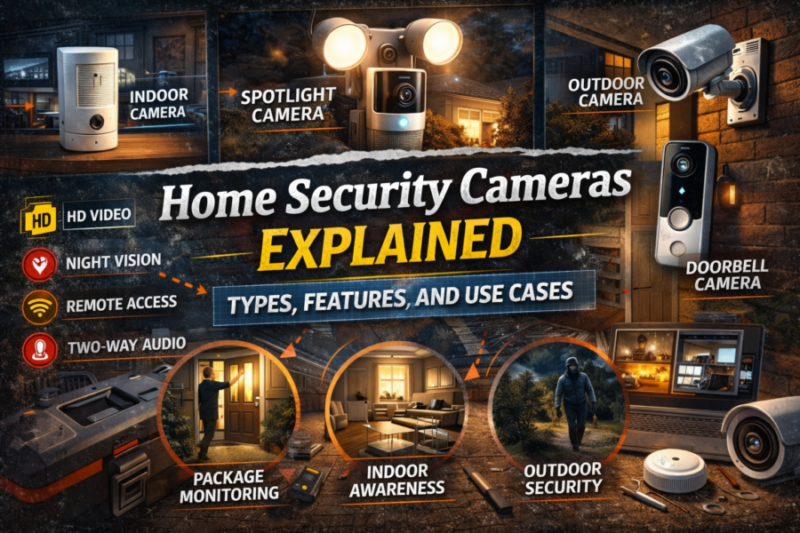
Home Security Cameras Explained: Types, Features, and Use Cases
TLDR
- Home security cameras fall into key categories: wired, wireless, battery-powered, doorbell, and PoE systems
- Resolution, field of view, night vision, and motion detection are core features that directly affect performance
- Local storage and cloud storage each have clear pros and trade-offs
- Proper placement matters more than simply adding more cameras
- Securing your network and enabling strong authentication is essential for protecting camera feeds
Security cameras are often the first upgrade people make when they want better visibility around their home. And honestly, that makes sense. Being able to open an app and see what’s happening at your front door or in your driveway brings a different level of awareness.
But not all cameras are built the same. The differences between types, features, and intended use cases matter more than most product pages let on.
If you’re building or upgrading a DIY security setup, here’s a clear breakdown of how modern home security cameras work and how to choose the right type for your space.
The Main Types of Home Security Cameras
Let’s start with structure. Most residential cameras fall into a few broad categories.
Wired Cameras
Wired cameras connect directly to power and often to a recording device through Ethernet or coaxial cables. Some use Power over Ethernet, which delivers power and data through a single cable.
These systems are known for reliability. Because they are physically connected, they are less dependent on Wi-Fi stability. They are common in larger homes or properties where consistent recording is a priority.
Installation is more involved. Running cable through walls or attics is not always beginner friendly. But once installed, they require minimal battery maintenance.
Wireless Wi-Fi Cameras
Wireless cameras connect to your home network and typically plug into a nearby outlet for power.
They are popular for DIY setups because installation is straightforward. Mount the camera, connect it to Wi-Fi, and you are usually operational within minutes.
The trade-off is that performance depends on network strength. Weak signals can affect live streaming quality or delay notifications. Placement should account for router distance and interference.
Battery-Powered Cameras
Battery-powered cameras are fully wireless and do not require a power outlet.
These are ideal for renters, apartments, or areas where running wiring is impractical. Modern battery cameras often use motion-based recording to conserve energy.
You will need to recharge or replace batteries periodically. In high-traffic areas with frequent motion alerts, batteries may drain faster.
Video Doorbell Cameras
Doorbell cameras combine a camera, motion detection, and a doorbell button into a single device at your primary entry point.
They provide live video, motion alerts, and two-way audio. Many models integrate with smart home ecosystems.
Because they focus on the front door, they are often the first camera homeowners install. They are especially useful for monitoring deliveries and identifying visitors.
Floodlight Cameras
Floodlight cameras pair motion-activated lighting with a built-in camera.
When motion is detected, the light activates and the camera records. This combination increases visibility and may deter unwanted activity by eliminating darkness around entry points.
They require proper mounting height and careful positioning to avoid false triggers from passing cars or animals.
Key Camera Features That Actually Matter
Marketing tends to emphasize buzzwords. In reality, a handful of core features determine real-world performance.
Resolution
Resolution refers to image detail. Common residential camera resolutions include 1080p, 2K, and 4K.
Higher resolution can provide clearer facial details and license plate information, especially when digitally zooming. However, higher resolution also requires more bandwidth and storage.
For most homeowners, 1080p or 2K is sufficient when combined with proper placement and lighting.
Field of View
Field of view measures how wide the camera can see.
A wider field of view covers more area, but extreme wide angles can introduce distortion at the edges. Narrower views may capture more detail in a specific zone.
For entry points, a balanced wide-angle lens typically provides full doorway coverage without excessive distortion.
Night Vision
Most modern cameras use infrared LEDs to provide black-and-white night vision. Some models offer color night vision when supported by ambient light or built-in spotlights.
Clear night performance is critical. Many incidents occur in low-light conditions, so check specifications for effective night vision range.
Placement near reflective surfaces or direct glare can impact clarity. Testing at night after installation is essential.
Motion Detection
Motion detection triggers recording and alerts.
Basic systems detect general movement. More advanced models use computer vision to distinguish between people, vehicles, and animals. This reduces unnecessary notifications.
Fine-tuning sensitivity helps prevent constant alerts from trees, shadows, or passing traffic.
Two-Way Audio
Two-way audio allows communication through the camera.
This feature is common in doorbell cameras and some indoor models. It can be useful for speaking to delivery drivers or alerting someone that they are being recorded.
Audio quality varies, so expectations should be realistic. It is a convenience feature, not a replacement for direct interaction.
Storage Options: Local vs Cloud
Every camera needs a way to store footage.
Local Storage
Local storage typically uses microSD cards or network video recorders.
Footage remains on-site, which reduces reliance on subscription services. However, if a camera is stolen or damaged, stored footage may be lost unless backed up elsewhere.
Storage capacity determines how long footage is retained before being overwritten.
Cloud Storage
Cloud storage uploads video clips or continuous recordings to remote servers.
This protects footage if the physical device is damaged. It also allows remote access from anywhere with an internet connection.
Cloud plans usually involve recurring fees and depend on stable internet service.
Many homeowners choose a hybrid approach when possible.
Indoor vs Outdoor Use Cases
Camera selection should match the environment.
Outdoor cameras must be weather resistant. Look for IP ratings that indicate protection against dust and water. Mounting height and angle are especially important outdoors to avoid tampering and glare.
Indoor cameras often focus on entry points, hallways, or main living areas. Privacy considerations matter. Some cameras include physical lens covers or scheduled recording settings.
I personally recommend limiting indoor placement to high-traffic areas rather than private spaces. Coverage should support safety without compromising comfort.
Placement Strategy: Quality Over Quantity
Adding more cameras does not automatically improve security.
Prioritize key access points. Front doors, back doors, garages, and ground-level windows are logical starting points. Driveways and side yards may also benefit from coverage.
Mount cameras high enough to reduce tampering but angled to capture faces. Avoid pointing directly into bright light sources.
Before drilling permanent mounts, test angles using temporary placement. It saves frustration later.
Network and Account Security
A camera is only as secure as the network it runs on.
Home routers should use current encryption standards and strong passwords. Default credentials for cameras must always be changed. Firmware updates address known vulnerabilities and should be applied regularly.
Two-factor authentication, when available, adds an additional layer of protection to camera accounts.
Cybersecurity agencies consistently emphasize these steps because connected devices can become targets if left unsecured.
Integrating Cameras Into a Layered System
Cameras work best as part of a broader DIY home security strategy.
They provide visibility and documentation, but they do not physically stop entry. Pairing cameras with reinforced doors, motion lighting, and alarm systems creates overlapping layers.
When motion lighting activates and a camera records simultaneously, visibility and evidence combine. If an alarm triggers, cameras help confirm what happened.
Layered security reduces reliance on any single device.
Conclusion
Home security cameras are powerful tools when used intentionally.
Understanding the differences between wired, wireless, battery-powered, and doorbell models helps you choose the right fit. Paying attention to resolution, night vision, motion detection, and storage options ensures the system performs the way you expect.
Most importantly, placement and network security matter as much as brand or price.
You do not need the most expensive camera on the market. You need the right camera, installed thoughtfully, integrated into a layered security plan that reflects how your home is actually used.
That approach keeps things practical, manageable, and effective.
Blog
-
Best Budget Home Alarm Systems
Budget home alarm systems can provide solid protection without long-term contracts or expensive professional installation.
-
Best DIY Home Security Cameras for Apartments
Apartment security does not require a complicated system.
